 Screenshot Maker
Brooks Marquez · Tutorials · 8 min read · 2026-10-19
How to Make a Crypto Wallet Mockup for a YouTube Tutorial
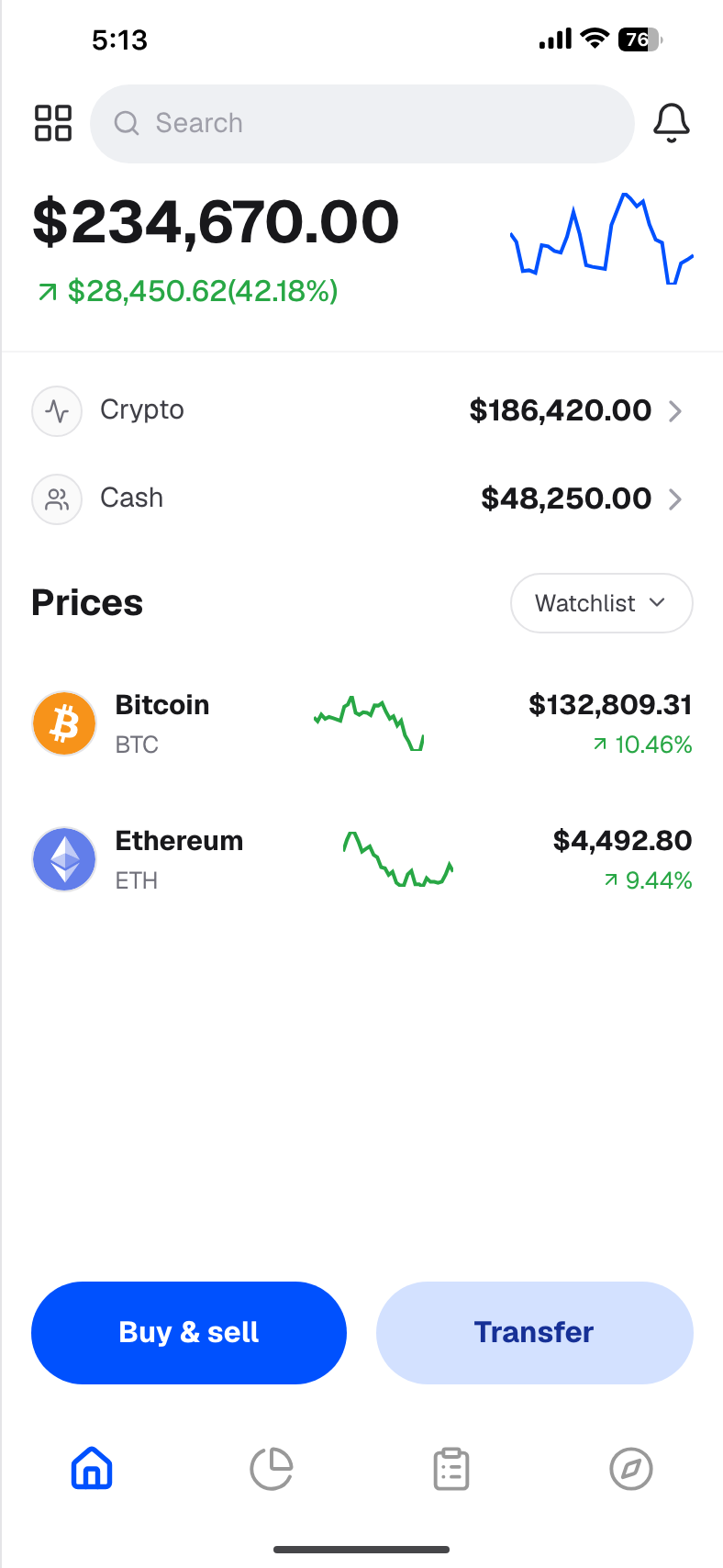
A crypto wallet mockup lets you teach a wallet screen without opening the wallet that actually holds your coins. You pick a template, type sample token amounts, and export a PNG you can drop into a YouTube lesson, a course slide, or a thumbnail. The image looks like a wallet home. It is not connected to a chain.
This is a how-to for creators. The crypto wallet app page is the template itself. Use that when you want to open the editor. Stay here when you want the filming workflow: what to leave off camera, which numbers to type, and how to export a still that survives a 1080p crop.
Why you should not film your real wallet
A screen recording of a live wallet is the fastest way to publish more than the lesson. Viewers, and anyone who downloads the video, can pause on details you did not mean to share.
What usually leaks:
- A full or shortened receiving address, or an ENS name that resolves to one
- A QR code that is a payment request
- A transaction hash that leads to the rest of the account on an explorer
- Token balances and a USD total that tell strangers how much sits in that wallet
- A connected dapp, a browser extension popup, or a notification with a second account name
That is a safety problem, not a style problem. Address and balance details get scraped. Phishing replies then quote the exact bag you just showed. A course that says "never share your seed phrase" and then films the wallet that seed controls sends a mixed message.
You also cannot safely "just crop it." A 4K timeline still contains the frames you scrolled past. Chat overlays, OBS sources, and a second monitor in the reflection have all ended up in published lessons. A still mockup has one frame, and you typed every character in it.
Never type a seed phrase, a private key, or a recovery word list into a mockup. Those do not belong in a tutorial image at all. If a lesson needs to explain recovery, use a numbered list of the words "word one" through "word twelve," not a real phrase.
What a tutorial wallet screen needs
A beginner lesson needs a screen a viewer can parse in two seconds while you talk. That is a short list, not a full portfolio export.
Include:
- A wallet or app name in the header, so the lesson has a subject
- One total, in a currency your audience already uses
- Three to six tokens, with a name, a ticker, and an amount
- A status bar or phone frame if the lesson is "this is the mobile app"
- Type large enough to read when the video is watched on a phone
Leave out anything that only a live account would have: a copy-address button that shows a real string, a recent-activity row with a real counterparty, push notifications, and your own username if that username is searchable.
If the lesson is about a specific wallet brand, say so in the narration and keep the image clearly labelled as a sample. A Phantom-style lesson can use the Phantom-style wallet layout for that one screen. A generic "how a wallet home is organized" lesson should stay on an unbranded wallet so you are not implying a partnership.

Create a screenshot to get more engagement.
Pick a template, edit the numbers, and export.
Start FreeStep by step: build a crypto wallet mockup for the lesson
1. Open the free Crypto Wallet template
Start in the free Crypto Wallet editor. It is a phone-style wallet home: a total, a cash row, and a short coin list. You do not connect a wallet and you do not paste an address.
If the lesson needs a longer holdings list, switch to the Crypto Wallet APP editor and keep the same sample numbers. The crypto template library is the index if you want a PnL card or a positions list later in the same course. Do not mix those layouts into the wallet chapter. A wallet chapter is about holdings. A trade chapter is about a position.
2. Write the one sentence the still has to say
Before you touch a number, write the sentence you will say while the image is on screen. Examples: "A wallet home shows a total and a few tokens." Or: "Stablecoins sit next to BTC so the bag is not one coin." The still should prove that sentence and nothing else.
If you cannot say the sentence without a real balance, the still is doing the wrong job. Move the real figure to a spreadsheet you do not record, and put a round sample on the image.
3. Use round, obviously sample amounts
Sample amounts should be easy to say out loud and hard to confuse with a live account. A useful starter set:
| Token | Amount | Sample value |
|---|---|---|
| BTC | 0.25 | $16,000 |
| ETH | 2.00 | $6,400 |
| USDC | 1,000 | $1,000 |
| Total | $23,400 |
Say the total in the narration: "This is a sample bag of about twenty-three thousand dollars, not my wallet." Put the same phrase in the video description and in the first comment. Round thousands read as a lesson. A total of $23,418.07 reads as a cropped account.
Match the price to the amount. If BTC is shown at $64,000, then 0.25 BTC is $16,000. If you change the price, change the line value and the total in the same edit. A tutorial that cannot add up teaches the wrong habit.
4. Match the icon to the ticker
BTC gets a bitcoin mark, ETH gets an ethereum mark, USDC gets a dollar-style stable mark. A blank circle on a major coin makes the still look unfinished, and viewers spend the next ten seconds wondering if the app is broken instead of listening. Use the icon picker in the editor. Do not upload a logo you do not have rights to use if the lesson is branded as your own product.
5. Export a PNG, then place it in the edit
Export from the editor and drop the PNG on the timeline as a full-screen still, or as a picture-in-picture over your face. A still is easier to caption than a screen recording: you can hold it while you explain quantity versus value versus daily change.
Record the editor itself only when the lesson is "here is how I change the number." In that recording, the template is the subject. Your real wallet stays closed. Crop to the preview, not to your desktop, so bookmarks and inbox notifications stay out of the frame.
Export before you record the voiceover. If you change a number after the voiceover mentions it, the still and the audio drift apart and you will re-record.
Screen recording versus a still PNG
Use a still when the viewer needs to read a number. YouTube compression softens small type, and a moving recording makes it worse. A PNG exported at the template's full width stays sharp when you scale it to 1920×1080.
Use a short recording when the lesson is a gesture: opening a token, switching a chart range, or scrolling a list. Record that gesture inside the editor preview, with sample data already in place. Trim the clip so it starts on the sample screen, not on your browser chrome.
For thumbnails, export the same PNG and enlarge the total. Thumbnail type has to survive a phone-sized YouTube grid. If the ticker names disappear at that size, the thumbnail is a poster, not a wallet, and you should design it that way on purpose.
Checklist before you upload
Read the still at phone width and check each line.
- No address, ENS, QR code, or transaction hash
- No seed words, not even partial
- Total equals the sum of the token lines
- Icons match the tickers
- The title, description, and pinned comment say the figures are a sample
- The spoken line matches the number on screen
- The still is not presented as your results, a client's results, or a giveaway
If a sponsor asks for "your real PnL" in the same video, that is a different asset. Do not swap a mockup in and leave the sponsor's claim in the title. Either show a consented, real capture with the sensitive fields removed, or change the claim.
FAQ
What is a crypto wallet mockup?
A crypto wallet mockup is a sample wallet screen you edit yourself: totals, token rows, and icons, exported as a PNG. It is for lessons, landing pages, and thumbnails. It is not a connected wallet and it does not hold coins.
Can I use a crypto wallet mockup in a YouTube tutorial?
Yes, when the video is teaching the interface or a workflow and the image is labelled as sample data. Do not use it as proof of a balance, a giveaway, or a client's holdings.
Should I blur my real wallet instead?
Prefer a mockup. Blur and pixelation can be sharpened, and a screen recording still contains frames you forgot to cover. A mockup never contained the real address.
Which template should a beginner lesson start with?
Start with the free Crypto Wallet template. Move to a longer holdings layout only when the lesson is about a token list, and to a PnL card only when the lesson is about a trade.
Create a screenshot to get more engagement.
Pick a template, edit the numbers, and export.
Start FreeWhat to publish next
Record the lesson against the still, say the numbers out loud, and keep the sample label in the description. When the next chapter is a trade instead of a bag, switch templates rather than forcing a wallet home to show an entry price. The wallet mockup did its job if a viewer can follow the lesson and still cannot find your address.