 Screenshot Maker
Brooks Marquez · Tutorials · 7 min read · 2026-08-18
How to Make a Fake WhatsApp Screenshot (Free Chat Generator)
A fake WhatsApp screenshot is a chat image that looks like the real app: green chrome, a contact name, online status, and bubbles you wrote yourself. You do not need a WhatsApp account, a second phone, or a staged conversation with a coworker.
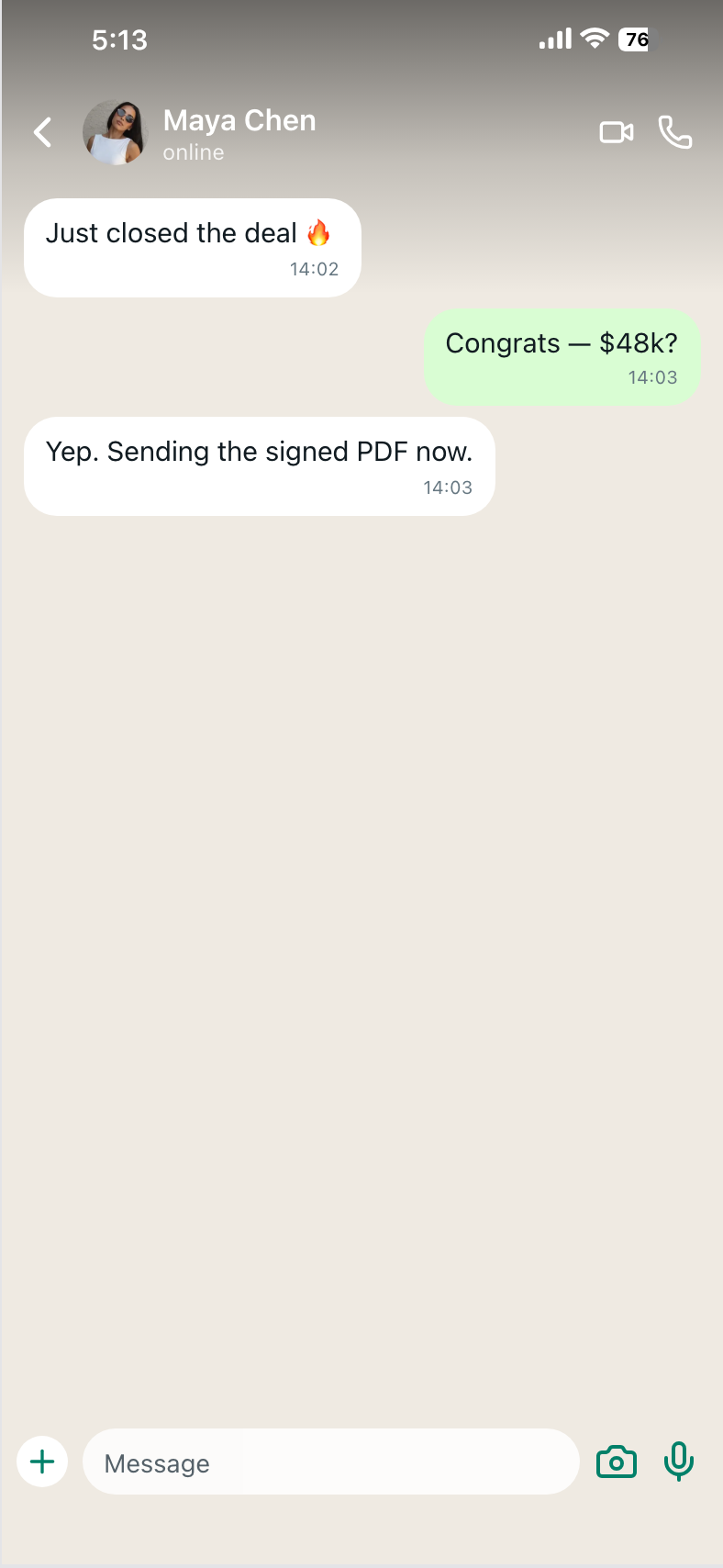
People search how to make a fake WhatsApp screenshot, WhatsApp chat generator, fake WhatsApp conversation, and fake text WhatsApp when they need social proof for an ad, a landing-page testimonial, a meme, or a lighthearted fake chat prank creative. The simple path is a free fake chat maker: pick the WhatsApp template, rewrite the thread, export PNG.
1. Decide the one thing the chat has to prove
Before you type a single bubble, write the job in one line. Examples that work:
- A customer saying the product shipped and it works
- A short yes to a sales follow-up
- A two-message support fix ("try this" / "that worked")
- A joke beat for a meme or prank-style post (still keep names fictional)
WhatsApp screenshots die when the thread tries to be a press release. Real chats are short, uneven, and a little messy. If you cannot say the point in three or four bubbles, cut copy, do not add more.
For scene ideas already mapped to this layout, see the free WhatsApp chat generator.
2. Open the free WhatsApp chat generator, not a blank canvas
Go to the WhatsApp editor on Screenshot Maker. The WhatsApp template is free. The frame already has WhatsApp-style header, status, and bubble sides. You are not rebuilding the app in Figma.
Set these first, in this order:
- Contact name — first name plus last name, or a first name only. All-caps brands look like ads inside the header.
- Status —
onlineis the default people expect.last seen today at 10:41also reads native if the story is not "they replied instantly." - Avatar — a face or a simple initial. A leftover stock logo from another brand is an easy fake tell.
Leave timestamps until the messages exist. Clocking an empty thread is wasted work.
3. Write bubbles like texts, not emails
Each message has a side (them / me), text, and a time. Keep sentences the length of a thumb. Questions, fragments, and one emoji max is closer to WhatsApp than a paragraph with a greeting and a sign-off.
A usable pattern:
- Them: "Got the files?"
- You: "Yep, just sent the zip."
- Them: "Looks good, we'll use this."
Advance the clock. Three messages all stamped 10:41 look generated. A one-minute gap, then a later reply, is enough texture.
Do not mix Instagram handles or iMessage blue into a WhatsApp header. Green chat is its own language. If the story belongs on iPhone Messages, switch to the free iMessage chat maker. If it belongs in Instagram inbox, use the Instagram chat generator.

Create a screenshot to get more engagement.
Pick a template, edit the numbers, and export.
Start Free4. Check the screenshot the way a stranger would
Squint at the preview like a paid-social thumbnail:
- Can you read the last bubble at phone size?
- Does the name match the story (a customer, a founder, a support person)?
- Would anyone actually send that sentence in WhatsApp?
If the answer to the last one is no, rewrite. The generator cannot save corporate copy.
Create a screenshot to get more engagement.
Pick a template, edit the numbers, and export.
Start Free5. Export a PNG and crop for the channel
Download full resolution from the editor. For Meta or TikTok ads, crop tight on the header plus two or three bubbles. For a website proof strip, keep more of the thread so it looks like a real capture, not a sticker.
The same workflow lives under Messaging templates if you need lock screen or mail frames next to chat.
When a WhatsApp fake screenshot is the wrong tool
Use a different app chrome when the audience does not live in WhatsApp. US consumer iOS ads often want iMessage. Creator collab stories often want Instagram chat. Launch-on-X stories want X DM.
WhatsApp wins for global consumer ads, founder-to-buyer close threads, and any market where green bubbles are the default "this is a real person."
FAQ
Is there a free WhatsApp chat generator / fake chat maker here?
Yes. Open the free WhatsApp chat generator, set contact and messages, export PNG. Nothing connects to WhatsApp.
How do I make a fake WhatsApp conversation or fake text WhatsApp screenshot?
Rewrite the bubbles into a short fake WhatsApp conversation, then export. Same tool whether you call it fake text WhatsApp, fake chat conversation, or WhatsApp conversation fake.
Can I use this for a fake chat prank or meme?
Yes, for lighthearted creatives. Do not put a real person's name and photo on a fabricated thread without permission.
Is a WhatsApp chat generator legal to use in ads?
You are making a mock UI, not impersonating a real person or claiming a real conversation happened. Get consent before using identifiable people.
Can I change who is speaking?
Yes. Each bubble is me or them.
Does this work for WhatsApp Business?
The template is consumer-style chat chrome, which is what most ads need. You are not exporting from a Business API account.
Next
If you have the scene in one sentence, you can make the screenshot in the editor in a few minutes. Start here: messaging-whatsapp-chat.