 Screenshot Maker
Brooks Marquez · Tutorials · 8 min read · 2026-10-19
PnL Calendar Explained: How Traders Read a Month of Results
A PnL calendar is a month laid out like a wall calendar, with each day's trading result in the cell and a total for the month. Traders use it to see streaks, quiet days, and whether a green month was one lucky session or a lot of small ones. "PnL" is profit and loss. The calendar is the shape of that profit and loss across days, not a single trade.
This page explains how to read one and how to build a sample for a journal post. The tool page for the month grid is the PnL calendar. A single day's trade belongs on the Futures PnL card. The calendar is the month around that day.
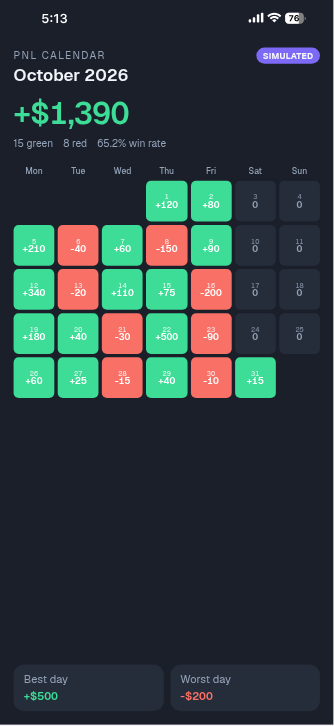
What a PnL calendar shows
Each cell is one session, usually one calendar day in the trader's own timezone. The cell holds a dollar result, a percentage, or both. Weekends and days with no trades stay empty or show zero. You should say which, because "zero" and "no trade" are different facts.
Around the grid you usually see:
- The month name and year
- A monthly total, which must equal the sum of the daily cells
- A count of green days and red days
- Sometimes a win rate: green days divided by days that had a trade
The grid is a summary. It does not show entries, exits, or size. A +$500 Tuesday can be one clean trade or a dozen messy ones that happened to net positive. The calendar answers "what did the month feel like," not "what was the setup."
People also search for a trading PnL calendar inside a journal app, or a PnL calendar on TradingView. Those products compute the cells from imported fills. A mockup does not. You type the cells. That is appropriate for a tutorial thumbnail or a blank journal example. It is the wrong tool if you want your broker's numbers reconciled for taxes.
How to read the heatmap and the win rate
Color is a shortcut. Green is a day that made money, red is a day that lost money, and a deeper color often means a larger move. Read the number anyway. A calendar that encodes size only as color hides the one day that made the whole month.
Win rate on a calendar is day-win-rate, not trade-win-rate. If you took four trades on Monday and three lost, Monday can still be green. Quoting "80% win rate" off a calendar without saying "of days" overstates the record. Prefer: "11 green days, 6 red days, 4 flat, out of 21 sessions."
Streaks matter more than the average. Five small red days in a row will not always show up in the monthly total, and they are exactly the pattern a journal is for. Look at the row, not only the footer.
Here is a sample October, Monday to Sunday, in dollars. Zeros are days with no session, not a scratch trade. The point of the grid is that you can add it by hand.
| Week | Mon | Tue | Wed | Thu | Fri | Sat | Sun |
|---|---|---|---|---|---|---|---|
| 1 | 120 | -80 | 210 | -40 | 60 | 0 | 0 |
| 2 | -150 | 340 | 90 | -20 | 110 | 0 | 0 |
| 3 | 75 | -200 | 180 | 40 | -30 | 0 | 0 |
| 4 | 500 | -90 | 60 | 25 | -15 | 0 | 0 |
| 5 | 40 | -10 | 15 | 0 | 0 | 0 | 0 |
Week totals are 270, 370, 65, 480, and 45. The month is 270 + 370 + 65 + 480 + 45 = 1,230. There are 23 session days: five weekdays in each of the first four weeks, plus Monday, Tuesday, and Wednesday in week 5. Green days: 120, 210, 60, 340, 90, 110, 75, 180, 40, 500, 60, 25, 40, 15. That is 14. Red days: -80, -40, -150, -20, -200, -30, -90, -15, -10. That is 9. Flat days are the zeros, and they are not in the win rate. Day win rate is 14 / (14 + 9) = 60.9% of sessions, not of trades.
Notice week 4. Monday is +500, and the other four sessions net −20. That one day is 500 / 1,230, about 40% of the month. An honest caption says so. A caption that only says "green October, +$1,230" hides the concentration.
Build one from your own journal
If you trade live and you want a real calendar, start from fills, not from memory.
- Export the day's closed trades from the venue or from the journal you already trust.
- Sum realized PnL for that calendar day in one currency. Do not mix an unrealized mark from an open position into yesterday's cell.
- Decide where funding, fees, and commissions go. Subtract them in the same cell, or keep a separate "costs" row. Say which you did.
- Convert to the display currency once per day, at one rate, and write the rate down if it moves the total by more than a rounding error.
- Add the cells. The monthly total is that sum. If your spreadsheet footer disagrees, the footer is wrong or a cell is double-counted. Do not publish until they match.
A simple check: the month equals the sum of the weeks, and each week equals the sum of its days. The sample above passes that check. Your sheet should too.
Keep the raw export. The calendar is a view. When a number is challenged, the fills are the record. A screenshot of the grid is not.
A labelled sample for journal content
Course creators and journal accounts often need the grid before the month is over, or they need a clean example that is obviously not their account. Build that example the same way as the table above: pick round days, add them, and put the total in the footer only after the sum is done.
The month itself belongs on the PnL calendar editor. The table above is a worked example you can add by hand. The template's default October is a different sample, and its footer is the sum of its own cells. Use the Futures PnL card when you want to zoom into one day, in the Futures PnL editor. Link that day to the cell. In the table above, the +500 day can be that one card; the other days stay in the grid. The futures card is the zoom for that session, not a substitute for the month.
Label the image in three places: on the image ("Sample October, not a live account"), in the post caption, and in the alt text. Round numbers help. A month total of $1,230.00 from the table above is clearly a lesson. A month total copied from a broker down to the cent, sitting on a grid you typed by hand, invites people to treat it as the broker.
The crypto templates cover the related screens: wallet, positions, and single-trade cards. None of those is a calendar. Do not crop a positions blotter and call it a month. The blotter is a list of open or recent trades. The calendar is one number per day.

Create a screenshot to get more engagement.
Pick a template, edit the numbers, and export.
Start FreeStep by step: check a calendar before you post it
1. List the session days
Write each day you want on the grid, including explicit zeros for days you did not trade if your layout shows them. Skip days that are not in the month.
2. Add across, then down
Sum each week. Then sum the week totals. Write that number in the footer. If you change one cell later, add the month again. Do not edit the footer by hand.
3. Count green and red separately from flat days
Win rate uses days with a trade. A zero you used to mean "no session" stays out of the denominator. If your zeros mean "scratched the day at break-even," put them in the denominator and say so.
4. Point at one day with a matching card
Pick one cell. Build a single-trade recap whose dollar result equals that cell, or whose percentage you explain in the caption. If the card cannot equal the cell because the cell is several trades, say "Tuesday was three trades, net +500."
5. Add the sample label and export
Put the label on the image. Export the PNG. Read it on a phone. If the monthly total is the only number you can see, the grid is too small and the post will be misunderstood.
FAQ
What is a PnL calendar?
A PnL calendar is a monthly grid of daily profit and loss. Each cell is one day. The footer is the sum of the cells. It shows the shape of a month, not the detail of a single order.
Create a screenshot to get more engagement.
Pick a template, edit the numbers, and export.
Start FreeHow is a PnL calendar different from a PnL card?
A card is one trade or one share image: pair, side, entry, exit, ROI. A calendar is every session in the month added together. Use a card to explain Tuesday. Use the calendar to show that Tuesday was half the month.
Do the daily values have to match the monthly total?
Yes. If they do not, the image is wrong. Add the weeks, then add the weeks into the month, and put that sum in the footer.
Can I post a sample calendar as my results?
No. A sample is for teaching the layout. Your results, if you publish them, should come from your own fills, with identifiers removed, and you should say they are real. Do not put a sample total in a sentence that says "I made."
Use the grid as a journal, not as a trophy
A calendar is doing its job when you can see the streak and the one oversized day. Add the cells before you trust the footer. Label samples as samples. When you need the trades inside one cell, open a positions list and keep the month beside it, not instead of it.