 Screenshot Maker
Brooks Marquez · Tutorials · 8 min read · 2026-10-19
How to Share Crypto Trades on X Without Exposing Your Wallet
Sharing a trade on X is useful. Sharing the wallet behind it is not. A raw account screenshot often includes an address, an exchange UID, a position size in dollars, and a transaction hash. Any one of those is enough for a stranger to look the rest up. This guide is the privacy workflow: what to remove, what to replace it with, and how to post a labelled recap instead of a cropped account page.
If you want the editor for a single trade, open the Futures PnL card after you have decided the figure is safe to publish. This article is about that decision.
What leaks in a trade screenshot
People crop the username and assume the rest is harmless. It usually is not. Pause on a typical futures or wallet capture and look for:
- A deposit address, a withdrawal address, or an ENS name
- A QR code in the corner of a receive screen
- A transaction hash or an order id that resolves on an explorer
- An exchange UID, email, or internal user number in the header or a share-card footer
- A dollar position size, margin balance, or account equity that tells people how large the account is
- A referral code that is tied to your identity on other posts
The dollar size is the one people most often leave in on purpose. It is also the one that attracts impersonation replies: "send me the same size and I will copy the next trade." You do not need the dollar figure to explain the idea of the trade.
What wallet privacy modes actually hide
Some wallets offer a privacy mode or a hide-balance toggle. MetaMask-style hidden balances and similar switches in other wallets cover the total on the home screen. They are worth turning on before any recording. They are not a complete redaction.
They often leave the address visible, leave activity rows visible, and reset when you open a token page. A share sheet generated by the wallet can put the address back in the image the toggle just hid. Treat privacy mode as a seatbelt for live use, not as an export preset for X.
If you must show a live app for a product demo, turn privacy mode on, disconnect every account you are not demoing, and switch the remaining account to a fresh address with no funds. Then still prefer a mockup for the post that will be downloaded and zoomed.
Why blur and pixelation fail as redaction
Blur feels like deletion. It is a filter. A mild Gaussian blur on an address can be reversed well enough to recover characters, especially when the typeface is known and the string is a checksummed address. Pixelation has the same problem at low block sizes. Both fail harder when the original file is still in your camera roll and later gets synced to a shared album.
Even a successful blur fails the moment the video has a second frame where the same field is sharp. X image posts are one frame. Screen recordings and photo bursts are not.
Redaction that works is removal. Delete the field, replace it with a label like "address hidden," or do not start from the live screen at all. Do not stack a blur on top of a real UID and call the post private.
Share the percentage, not the position size
A trade idea survives without the account size. The useful public fields are:
- The market, written the way the venue writes it (BTCUSDT, not a nickname)
- The side: long or short
- The leverage, if leverage is part of the story
- Entry and exit or mark, so a reader can see the move
- ROI as a percentage
Dollar PnL is entry-to-exit times size times direction. Publishing the dollars publishes the size once the prices are on the card. If you want the post to teach the setup and not the account, leave the dollars off or replace them with the percentage only.
A worked example you can say out loud: entry 100, exit 110, long, no leverage. The move is +10%. A $1,000 position and a $100,000 position show the same ROI. The second account does not need to appear for the lesson to be true. If you add 5x leverage, ROI on margin is larger than the price move. Say that in the caption so the percentage is not doing silent work.

Create a screenshot to get more engagement.
Pick a template, edit the numbers, and export.
Start FreeThis is also why a raw equity screenshot is a poor teaching tool. The number mixes the trade you want to discuss with every other position, the funding payment, and the cash sitting in the account.
Use a labelled recap card for strategy posts
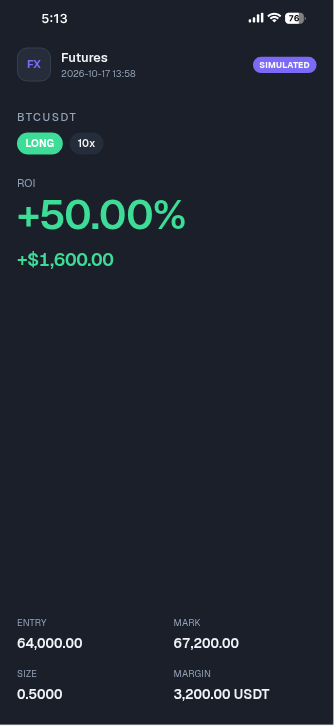
A recap card is a single image built to be posted: pair, side, leverage, entry, mark, and ROI. You type the fields. Nothing else from the account is in the file.
Use one when the post is a breakdown: what you saw, where you entered, where you exited, what you would repeat. Put "sample" or "illustrative" in the image caption on X, in the alt text, and in the card if the template has a username line. The alt text matters because people who do not see the image still read it, and so do scrapers.
Good fits:
- A single-trade recap in the Futures PnL card, edited in the Futures PnL editor, when the lesson is one position. It has pair, side, leverage, entry, mark, and ROI, and you can upload your own logo.
- A positions list when the post is "here is how a book of trades looks," built in the Crypto Trades editor
Keep the list short. Three rows that add up are clearer than twelve rows copied from a live blotter. If a row has a dollar PnL, make it equal (exit − entry) × size × direction, and keep the size obviously round.
Do not use a recap card as a performance advertisement. "I made this much, DM me" is a claim about results. A sample card cannot support it. If you have real, audited results and you want to share them, share them from the venue's own history after you remove identifiers, and say they are real. Do not mix that post with a mockup.
Step by step: post a trade without the wallet
1. Decide the public fields before you open a template
Write the market, side, leverage, entry, exit, and ROI in a note. Cross out the address, UID, order id, and dollar equity. If a field is not in the note, it does not go in the image.
2. Check that the percentage matches the prices
For a long, ROI before leverage is (exit − entry) / entry. For a short, it is (entry − exit) / entry. Multiply by leverage only if the card is showing return on margin and the caption says so. If the numbers disagree, fix the note. Do not "nudge" the percentage because it looks better.
3. Build the card from the note
Open the Futures PnL editor and type only the note. Set the app name to a lesson name, not an exchange login. Set the time to a fixed timestamp you choose, not a live clock you forgot to check.
4. Write the X post as a caption, not as proof
Lead with the setup. Then the numbers. Then one line: "Illustrative recap, not my account balance." Skip the dollar size. Skip the wallet address. Skip a QR code. Attach the PNG, add alt text that repeats the sample label, and read the preview at phone width before you post.
5. Re-read the image at full zoom
Zoom until type is crisp. Look at headers, footers, and watermarks. If you can still see an email, a UID, or a referral code, delete the file and export again. Do not cover it with a brush stroke.
Checklist
- Public fields are pair, side, prices, leverage, and ROI
- Dollar size is omitted, or round and labelled sample
- No address, ENS, QR, hash, UID, or email
- The percentage matches the prices and the leverage you claimed
- Caption, alt text, and on-image name all say the card is illustrative
- The post does not promise results or ask people to send funds
FAQ
How do I hide a wallet balance in a screenshot I already took?
Do not try to hide it in place. Cropping and blur leave recoverable type, and the original file is still on disk. Export a new image that never contained the balance, and delete the original from shared albums if you already uploaded it.
Is an ROI percentage safer than a dollar PnL?
Yes for privacy. The percentage describes the price move and, if you say so, the leverage. The dollar figure describes how big the position was. Publish the percentage when the point is the setup.
Can I post a positions list?
Yes, if every row is sample data or fully redacted, and the caption says which. A live blotter is the wrong source. A short list in the Crypto Trades template is built for that recap.
Does a privacy mode replace this?
No. Privacy mode hides some totals inside the app. It does not remove addresses from share sheets, and it does not protect frames you already recorded. Use it live. Use a labelled card for the post.
Before you hit Post
Read the caption once as if you were a stranger with an explorer tab open. If you can get from the image to a wallet, the image is not ready. Publish the setup. Keep the account off the timeline.
Create a screenshot to get more engagement.
Pick a template, edit the numbers, and export.
Start Free