 Screenshot Maker
Brooks Marquez · Tutorials · 6 min read · 2026-07-29
How to Create a Robinhood-Like Portfolio Screenshot
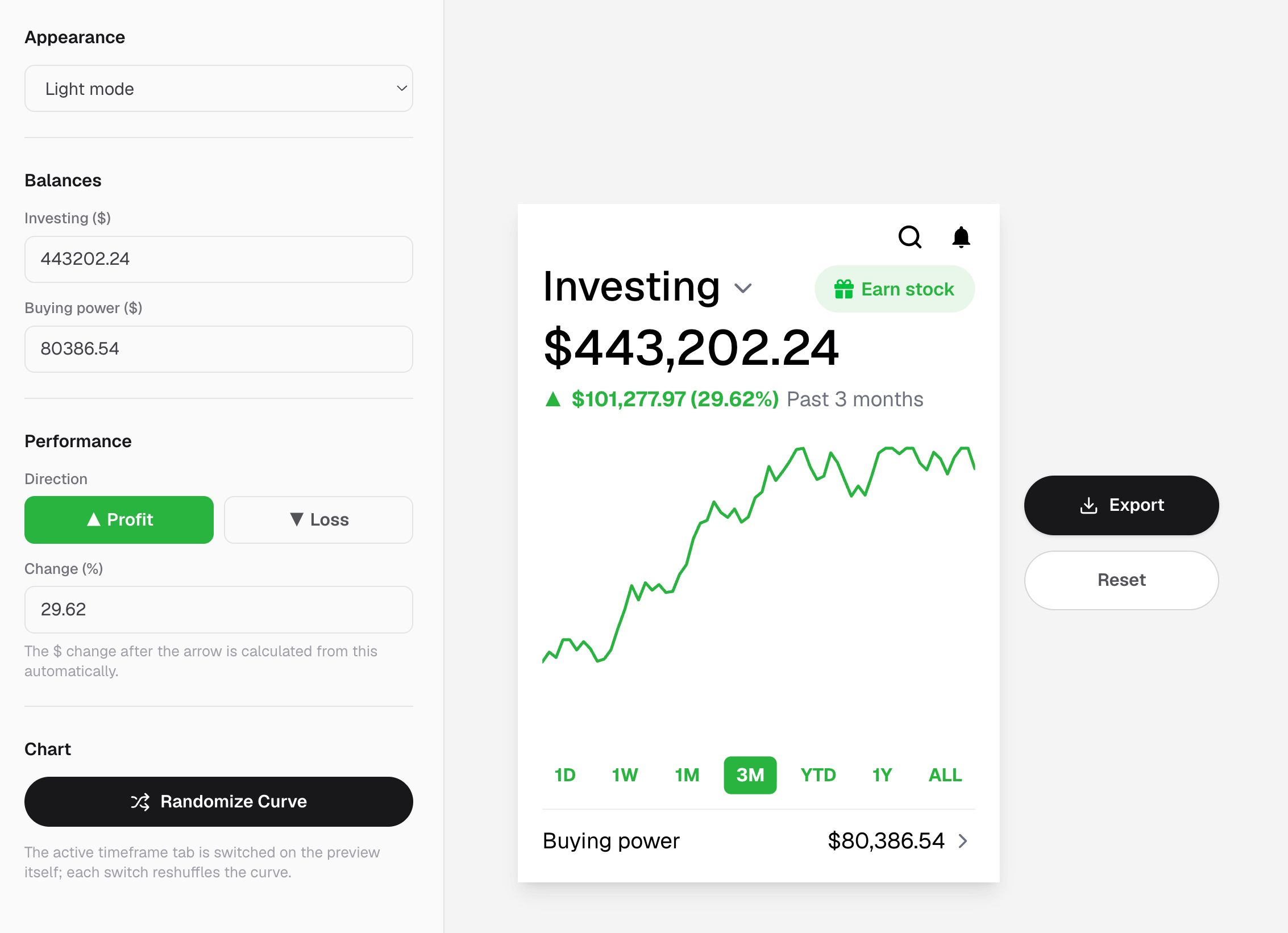
You need a Robinhood-like portfolio screenshot for a brokerage landing page, an App Store set, or a creator thread, and you do not want to log into a live account or paste real balances into a design file. That is a normal brief in fintech marketing. The faster path is a template that already feels like a retail investing home screen, then a few edits to the numbers and curve.

This guide shows how to make a Robinhood-style investing screenshot that looks native, when a broader stock portfolio screenshot or watchlist frame is the better fit, and which details make brokerage audiences trust the frame.
Why people need a Robinhood-like portfolio screenshot
Robinhood set the visual language for simple retail investing: big portfolio total, buying power, a clean profit curve, and time tabs like 1D / 1W / 1M / 3M / YTD / ALL. Founders borrow that look for store listings. Educators use it to explain investing vs cash. Agencies use it when the client brokerage is still in private beta.
Common reasons to generate one instead of capturing a live account:
- The product UI is not ready, but marketing needs an investing home screen now.
- You want a specific gain or loss story without exporting real brokerage data.
- You need light and dark variants of the same portfolio screenshot.
- Compliance prefers synthetic balances for ads, decks, and tutorials.
A strong Robinhood-like portfolio screenshot is about controlling the narrative. It is not about impersonating someone else's brokerage statement.
What a believable investing screen includes
Viewers skim these first:
- Investing balance — the big number that sets the mood
- Buying power — cash available to trade; investors notice when it is missing or absurd
- Profit or loss + change % — must agree with the curve direction
- Time range tabs — 1D vs 3M tells a different story; the selected tab should match the curve shape
- Curve texture — perfectly smooth lines look generated; small dips read as real markets
If the total is up 18% while the chart slopes down, the screenshot dies even if the chrome looks familiar.
Step by step: create a Robinhood-like portfolio screenshot
1. Open the investing performance template
On screenshotmaker.app, open the stock investing screen editor. That layout is built for Robinhood-style portfolio screenshots: investing total, buying power, P&L, time tabs, and a custom growth curve.
For the full scenario walkthrough, see the investing performance use case. If you need a denser total-value card instead of the full investing home, the stock portfolio screenshot maker is the sibling layout.
2. Write one sentence for the portfolio
Decide what the image must say before you touch the curve:
- "Steady 3M climb for a long-term story"
- "Green day, flat week" for a calm product demo
- "Drawdown recovery" for education or risk content
Then set investing balance and buying power so the cash vs invested split feels plausible. A $50,000 portfolio with $48,000 buying power can look odd unless that is the point of the story.
3. Tune profit, percent, and the selected time tab
Pick the tab that matches your sentence (1D for intraday, 3M for a journey). Set profit or loss and the change percent so they agree. A Robinhood-like portfolio screenshot fails fastest when the badge says +12% and the line is clearly red.
4. Shape the curve like a market, not a logo
Add small dips and plateaus. Retail investors have seen enough brokerage apps to spot a bezier rainbow. Keep the end of the curve consistent with the selected range and the P&L badge.
5. Choose light or dark for the channel
Dark frames often read well on mobile ads and App Store shots. Light frames sit cleaner on blog posts and pitch decks. Export both if you reuse the same stock portfolio screenshot across channels.
6. Export a full-resolution PNG
Download from the editor, then crop for Stories, LinkedIn, or a website hero. Keep the investing total large enough to read on a phone; tiny buying power text is a common export mistake.
Robinhood-like vs other stock screenshots
Not every stock brief wants the investing home screen.
| Goal | Better visual |
|---|---|
| Retail investing home / Robinhood feel | Robinhood-like portfolio screenshot (investing + buying power + curve) |
| Big total value with custom growth | Stock portfolio summary screenshot |
| Ticker list morning scan | Stock watchlist screenshot |
| Buy / sell moment | Trade ticket screenshot |
| Crypto bag instead of brokerage | Crypto wallet or holdings screenshot |
Use the Robinhood-like portfolio screenshot when you need that familiar retail investing chrome. Switch to a watchlist or trade ticket when the story is about scanning names or placing an order. For crypto-native bags, use a Phantom wallet screenshot or holdings frame instead of forcing tokens into a brokerage UI.
Mistakes that make a portfolio screenshot look fake
- Curve fighting the percent — up badge, down line
- Buying power that breaks the story — cash larger than the whole account with no explanation
- Time tab mismatch — "1D" selected on a multi-year mountain
- Too-perfect growth — a smooth rocket with no noise
- Vanity round numbers only — $100,000.00 with zero cents every time
- Wrong product language — futures jargon on a cash investing home
Fix the math and the tab before you obsess over colors.

Create a screenshot to get more engagement.
Pick a template, edit the numbers, and export.
Start FreeFAQ
How do I create a Robinhood-like portfolio screenshot? Open the stock investing screen on screenshotmaker.app, set investing balance, buying power, P&L, and the profit curve, then export a PNG. You do not need a live brokerage login.
Is this the same as a stock portfolio screenshot? Close. A Robinhood-like portfolio screenshot usually means the investing home with buying power and time tabs. A stock portfolio screenshot can also mean a simpler total-value card. Pick the layout that matches the story.
Can I show a losing portfolio? Yes. Set a negative change and a downward curve. Red days look more honest than endless green for many education and risk narratives.
What other screenshots pair with this? A stock portfolio summary for hero totals, a watchlist for ticker density, and a trade ticket for the order moment. For crypto, pair with a wallet or holdings screenshot instead.
Will it look real enough for App Store and ads? It will if balance, buying power, percent, selected tab, and curve all agree. Brokerage audiences forgive stylized chrome faster than they forgive broken performance math.
Bottom line
A Robinhood-like portfolio screenshot is a controlled investing home: clear total, believable buying power, honest curve, matching time tab. Start from the investing screen template, write one portfolio sentence, then export when the numbers and the line tell the same story.
When the brief shifts to a ticker list, an order ticket, or a crypto wallet, switch templates instead of stretching one frame. Open screenshotmaker.app, edit the investing view, and ship a stock portfolio screenshot that looks ready for a real brokerage story.
Create a screenshot to get more engagement.
Pick a template, edit the numbers, and export.
Start Free