 Screenshot Maker
Brooks Marquez · Tutorials · 7 min read · 2026-05-12 · Updated 2026-10-19
How to Create a SaaS Dashboard Mockup
A SaaS dashboard mockup is a product screenshot you assemble for a landing page, a docs page, or a feature announcement. It is a better starting point than a capture of a half-empty staging account: empty charts, "test user" rows, and last year's dates are what visitors notice first.
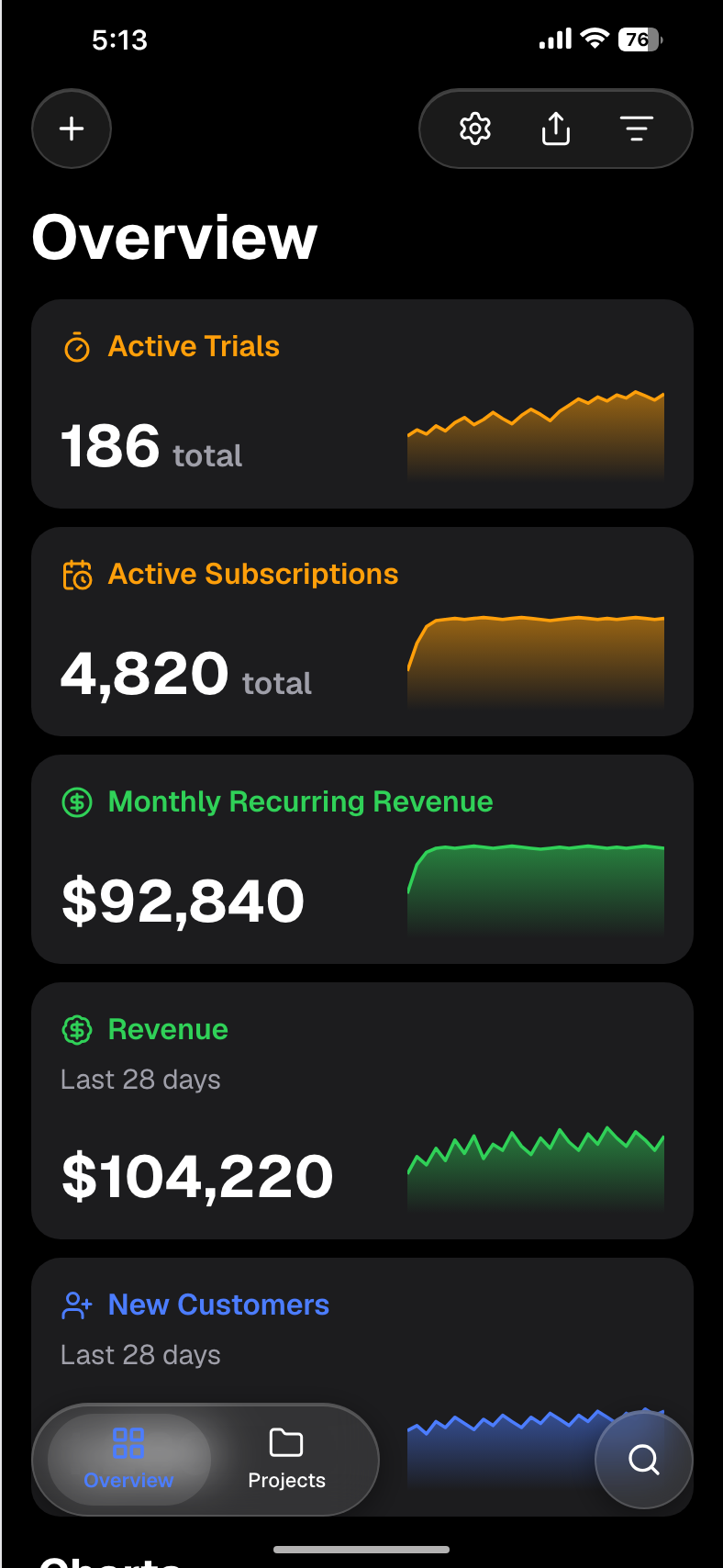
The free place to try this in the browser is the Digital Products Store template. For a recurring-revenue layout, use the MRR dashboard walkthrough, and for a broader KPI screen use the app revenue dashboard. Both live under dashboard templates.
Step by step: make the screenshot
1. Write the one sentence the screen has to support
"Teams see weekly active workspaces" is a different picture from "finance sees MRR." If you cannot say the sentence, you will fill the card with every metric you have ever liked.
2. Open a template that already has that hierarchy
Start with the free store dashboard when you need revenue, orders, and a simple chart. Move to the MRR dashboard guide when monthly recurring revenue is the only headline. A social product can use the social media dashboard instead of forcing SaaS KPIs into a store layout.
3. Replace the sample numbers with one coherent month
Change the totals, the dates, and the row labels together. If the chart says "last 30 days," the caption and the "updated" line should say the same month. Leave "lorem ipsum" and "Customer 1" out.
4. Run the add-up check before you export
Divide MRR by paying customers. That quotient is ARPU, the average revenue per account. If the screen shows $48,000 MRR and 320 customers, ARPU is $150. That can fit a $49 seat with a few add-ons, or a $150 plan. It cannot fit a story that also says "everyone is on the $19 plan" unless you explain annual billing or a second product. Write the division in the margin of the doc. If you cannot explain it in one line, change a number.
5. Export the PNG and caption it
Download the full-resolution PNG. Place it at the size in the table below. Put "Product preview, sample data" in the caption or the alt text. Then read the page once as a stranger: if a sentence treats the mockup as this month's traction, delete the sentence or replace the image with a real chart.
Which metrics, by product type
Show fewer metrics, and make them the ones a buyer of that product expects.
| SaaS type | Lead with | Support with | Leave off the hero |
|---|---|---|---|
| B2B, seat-based | MRR or ARR, active seats | ARPU, logo churn, trial-to-paid | Server CPU, a vanity signup total with no activation |
| Usage-based or devtool | Active accounts, usage this period | Expansion, a usage cap, error rate if it is the product | A revenue number you do not have yet |
| Marketplace | GMV, orders, take rate | Active buyers and sellers | A single "revenue" figure that mixes GMV and fees |
| Creator tool | Subscribers or projects created | Earnings, payout status, publish count | Someone else's audience size |
Churn and growth need the same restraint. A smooth chart and a "40% monthly logo churn" badge describe two different businesses. For a planning range, single-digit monthly logo churn is what most B2B stories imply. If your narrative is a messy early month, show the dip in the chart too.
Dates are part of the math. A chart labelled January through June, with a footer that says "Updated 2 years ago," tells the reader the file is a leftover. Set the range, the comparison period, and the updated line to one calendar.
Make MRR, customers, and ARPU agree
Use one worked set and stick to it across the hero, the feature row, and the deck.
- MRR: $48,000
- Paying customers: 320
- ARPU: $48,000 / 320 = $150
- A plausible mix: 280 seats at $49 and a handful of annual or higher tiers that bring the average to $150. If you do not want to explain the mix, show 320 customers on a $149 plan and let ARPU sit at $149.
New MRR and churned MRR should also fit. If the chart adds $6,000 and loses $1,500, net new MRR is $4,500. Do not print "+22%" beside a line that is flat. Percent change is (this period − last period) / last period. Calculate it. Do not type a percent because it feels energetic.
Export sizes
Export the PNG at the template's full size, then place it. These are practical targets for the file you put on the page, not a platform's certification.
| Placement | Useful size | Notes |
|---|---|---|
| Landing hero | At least 1600px wide | Retina laptops crop a 800px image. Keep the headline metric in the top half. |
| Feature section | 800–1200px wide | One metric, large type. A full dashboard shrunk to 400px is unreadable. |
| Open Graph / social share | 1200×630 | The metric must survive a small card. Put type away from the edges. |
| Pitch-deck slide | 1920×1080 artboard | Leave margin. A dashboard jammed edge to edge looks like a screenshot accident. |
| Product Hunt gallery | About 1270×760 | Gallery images are wide and short. Crop to the chart, not the whole browser. |
Dark mode is a second export, not a CSS invert. If the landing page is light, a light UI usually sits more quietly. Use dark when the surrounding section is dark, or when you are matching a product that ships in dark mode. Check both at phone width.
Where a mockup does not belong
Investors read a traction slide as a report. Put real data there, labelled as actuals, or leave the slide out until you have them. A designed dashboard on that slide, even with a small caption, is how a seed conversation goes sideways. Use the mockup on the product slide, marked as a design or a preview. Pre-revenue stories can show a waitlist, letters of intent, or pilot counts instead of a chart of revenue you do not have.
Five mistakes
- Lorem ipsum, "Acme," or "User 123" left in a row.
- Totals that fail the MRR ÷ customers = ARPU check.
- A real customer's name or logo used as decoration.
- A chart range and a caption date that are years apart.
- Browser chrome cut through the middle of the tab bar, so the image looks cropped by accident.
FAQ
Can I use a dashboard mockup before launch?
Yes, on a product page, in a docs article, or in a design review, with sample data labelled as a preview. Do not put it on a slide or a tweet that claims those figures are current revenue.
What resolution should a hero screenshot be?
Wide enough that a laptop at 2x does not blur it. A practical floor is 1600 pixels across for a hero, and 1200×630 when the same asset is the share image. Start from the full PNG and scale down.

Create a screenshot to get more engagement.
Pick a template, edit the numbers, and export.
Start FreeShould the dashboard be light or dark?
Create a screenshot to get more engagement.
Pick a template, edit the numbers, and export.
Start FreeMatch the section it sits in, and match the product if the product has a strong mode. Export both if you are testing. Do not invert a light PNG and hope the text survives.
How do I avoid it looking like a generic template?
Change the product name, the metric that leads, and the row labels so they describe your product. Keep one accent color. Remove any metric you would not mention in the headline. A template looks generic when every default is still in place, not because it started as a template.
Edit one
Open the free Digital Products Store dashboard, change the name and the totals, run the ARPU division, and export. If the story is recurring revenue, continue with the MRR dashboard. Caption the image as sample data before it ships.